


 English
 Deutsch
 Español
 Italiano
 Polski
 Română
 Türkçe
 Português
 Magyar
 Čeština


Grand Opening
Refined systems, rebuilt features and something meaningful to work toward: a closer look at everything Eryon has become.
Getting Started
Foreword
It has taken time, countless iterations, and a lot of work behind the scenes, but the vision is finally coming together. Over the past months, existing systems have been refined, entire features have been rebuilt, and new ideas have been introduced to create an experience that feels rewarding from the very beginning.
At its core, Eryon is about progression, competition, and having something meaningful to work toward. Whether your focus is PvE, PvP, farming, trading, or simply building the strongest character possible, every part of the game is designed to give you a reason to keep pushing forward.
This presentation offers a closer look at what has been created, what has changed, and the systems that shape the world you are about to enter. Welcome to Eryon.
Getting Started

Glaive+9
Attack Value 86 - 94
Monk Plate Armour+9
Defence 66
Traditional Helmet+9
Defence 41
Battle Shield+9
Defence 57
Movement Speed -2%
Leather Shoes+9
Defence 1
Wooden Bracelet+9
Wooden Earrings+9
Wooden Necklace+9
Equipped From Day One
Your journey begins with everything you need to get straight into the action. Every player receives a complete +9 starter equipment set, giving you a strong and comfortable start from the very first minute.
The goal is simple: less time preparing, more time progressing — fully equipped and ready from day one.
Apprentice Chests
The starter kit is only the beginning. Along your first levels, the Apprentice Chests keep your inventory supplied, so the early game never slows down while you look for potions or basic items.
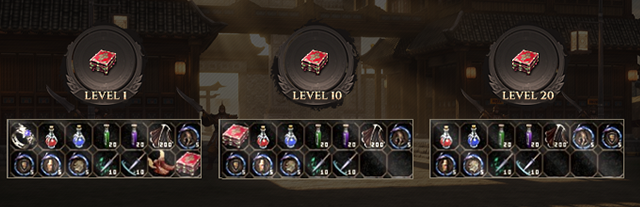
Level 1
Your first chest opens the moment you enter the world.
Level 10
A fresh supply once the first fields are behind you.
Level 20
One more chest to carry you into the next stage of progression.
Character Package
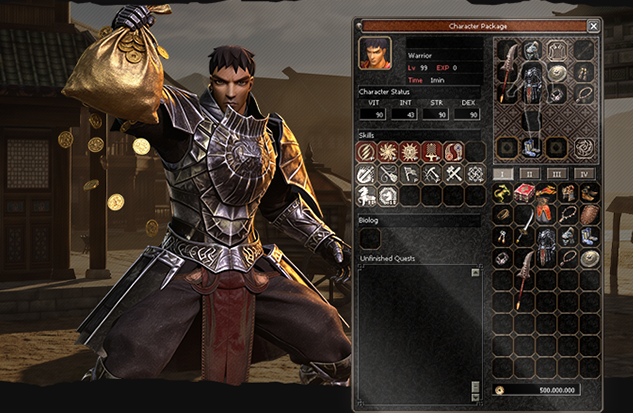
Ready To Play
The Character Package shows you everything a package contains before you take it: the character’s class and level, its status points, its skills and the equipment it carries.
Status, skills, Biolog progress and unfinished quests are all listed in one window, together with the inventory and the Yang that come with it — here a level 99 Warrior with 500,000,000 Yang.
No guesswork and no surprises: you see the whole character first, then step straight into the game with it.
Eryon Wikipedia
The Eryon Wikipedia is your in-game guide to the server: one place to look up the items, Metin Stones, bosses and systems you meet along the way, without leaving the game.
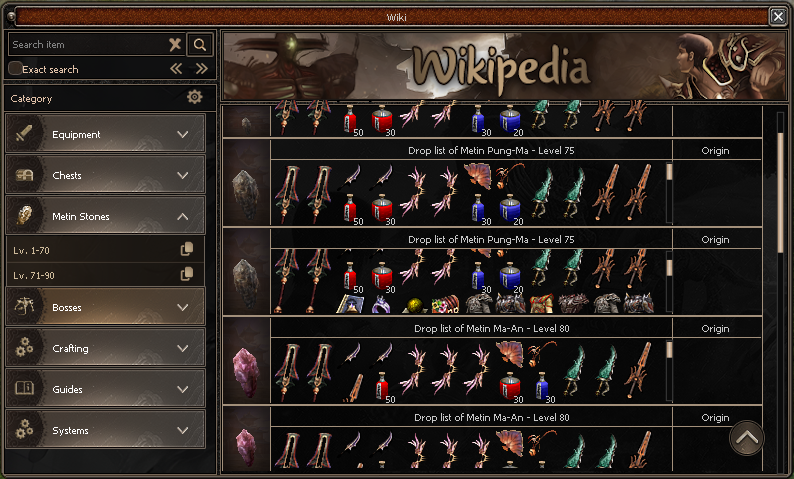
Everything In One Place
Search any item by name, or browse by category. Every Metin Stone and boss shows its complete drop list, sorted by level, so you always know where an item comes from and what a target is worth farming.
Open it whenever a question comes up, and get the answer in a few clicks, right where you are playing.
Item Search
Find any item by name, with an exact search when you need it.
Drop Lists
Every Metin Stone and boss, with what it drops and its level.
Equipment & Chests
Gear and chest contents, ready to compare.
Guides & Systems
Crafting, guides and every system explained.
Drop Limit
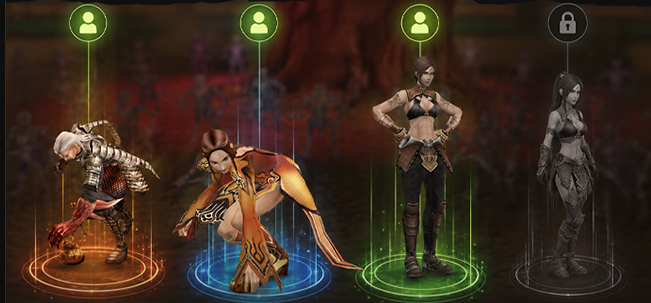
Fair Farming For Everyone
Eryon limits how many characters on one computer can collect drops at the same time. The characters that are allowed to farm are clearly marked, while any character beyond the limit stays locked and receives no drops.
The result is a healthier server: drops, Yang and market prices reflect real activity rather than multi-boxing, and the effort you put in is worth what it should be.
 Drops on This character farms.
 Locked This character does not.
Every Day
Gaya System
Nothing you collect has to go to waste. The Gaya System turns the items you no longer need into Gaya Points, a currency for its own shop.
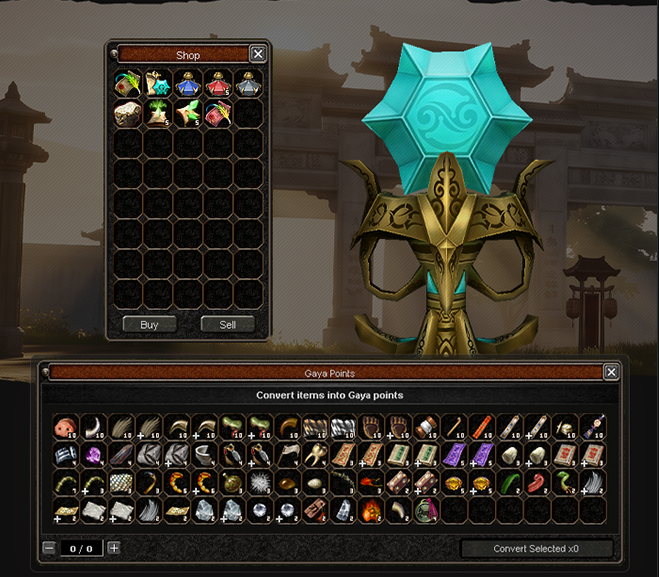
Convert, Then Shop
Open the Gaya Points window and every item that can be converted is listed with its amount. Select what you want to trade in, set the quantity and convert it all in one go.
Your points are spent in the Gaya Shop, where they buy useful items for your progression.
Materials, drops and leftovers that would otherwise fill your inventory become a steady source of value instead.
Craft System
The Craft System brings every recipe together in clear, readable windows: the item you make, its success chance, and exactly which materials it needs.
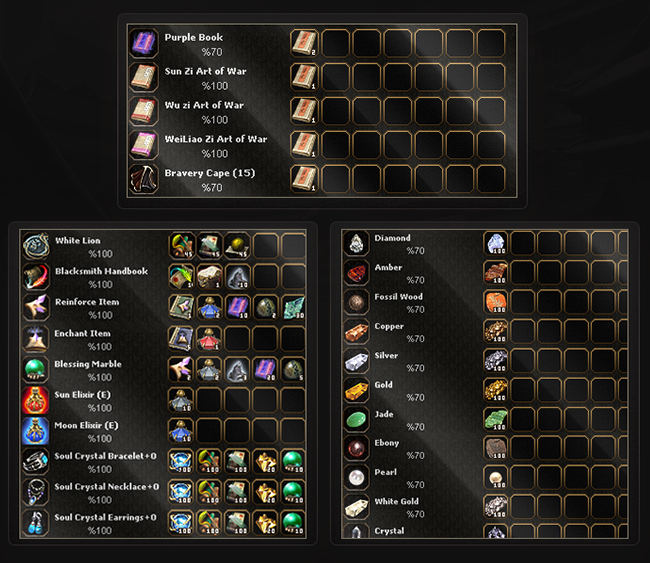
Know Before You Craft
Every recipe lists its ingredients slot by slot, with the amount each one needs, and shows its chance of success before you commit a single material.
Many of the most important items are crafted at a 100% success rate — from the Blacksmith Handbook, Reinforce and Enchant Items to the Sun and Moon Elixirs and the Soul Crystal jewellery.
Books, capes and ores have their own recipes too, so the materials you farm always have somewhere to go.
Books & Capes
Art of War books and the Bravery Cape from your own materials.
Upgrade Items
Reinforce, Enchant, Blessing Marble, elixirs and Soul Crystal jewellery.
Ores & Gems
Diamond, Jade, Gold, Pearl, White Gold, Crystal and more.
Special Inventory
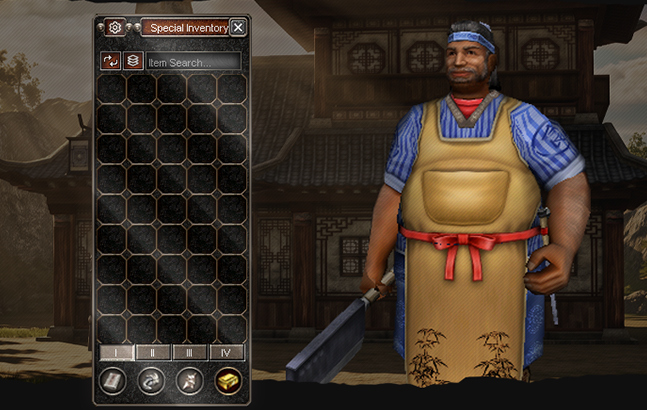
Room For Everything
Materials, books, stones and upgrade items get a home of their own. The Special Inventory keeps them out of your main inventory, spread over four pages and sorted by category.
Looking for something? Type its name in the item search, or let the sort and stack buttons tidy everything up in a single click.
Your main inventory stays free for what matters while you play — more farming, less sorting.
Mobile Sell
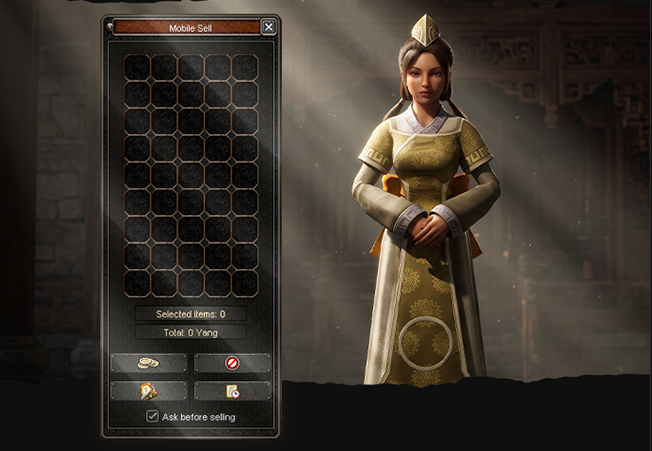
Sell From Anywhere
No more running back to town with a full inventory. With Mobile Sell you place the items you want to get rid of in one window and sell them on the spot, wherever you are farming.
The window counts your selected items and shows the total Yang you will receive before you confirm.
Keep Ask before selling switched on and nothing leaves your inventory by mistake.
Any Place
Sell without travelling back to a shop.
Total In Advance
See the Yang you will get before you sell.
Safe By Default
A confirmation keeps valuable items safe.
Character Power
Horse Upgrade
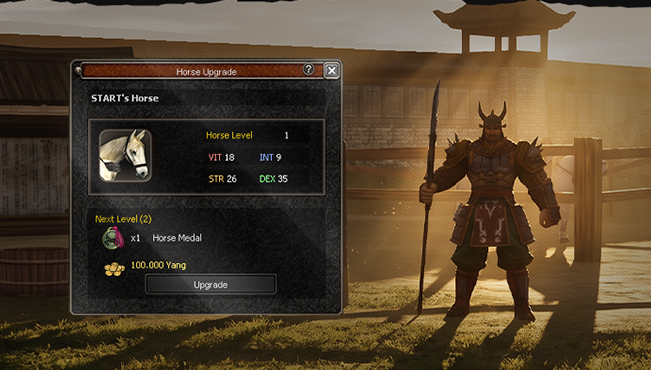
A Mount That Grows With You
Your horse is more than a way to travel. Every horse carries its own VIT, INT, STR and DEX, and each level makes it stronger.
The Horse Upgrade window shows your horse’s current level and stats, and exactly what the next level costs: a Horse Medal and Yang. One click on Upgrade and it is done.
- Horse Medal Needed for every level.

Biologist
The Biologist turns the items you collect into permanent bonuses. Bring in what the research needs, and every completed mission makes your character stronger for good.
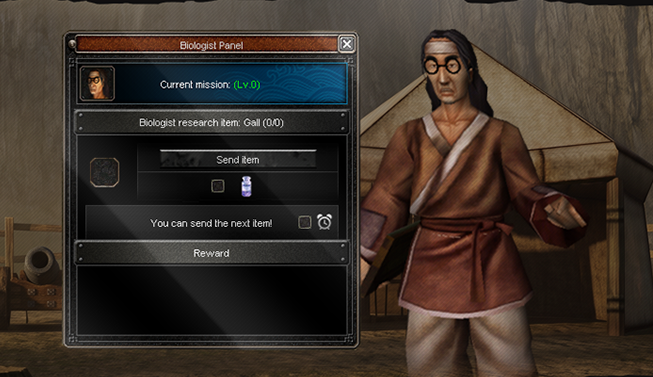
Send, Wait, Grow
The Biologist Panel shows your current mission, the research item it asks for and how many you have already handed in. Send an item, and the panel tells you when the next one can go.
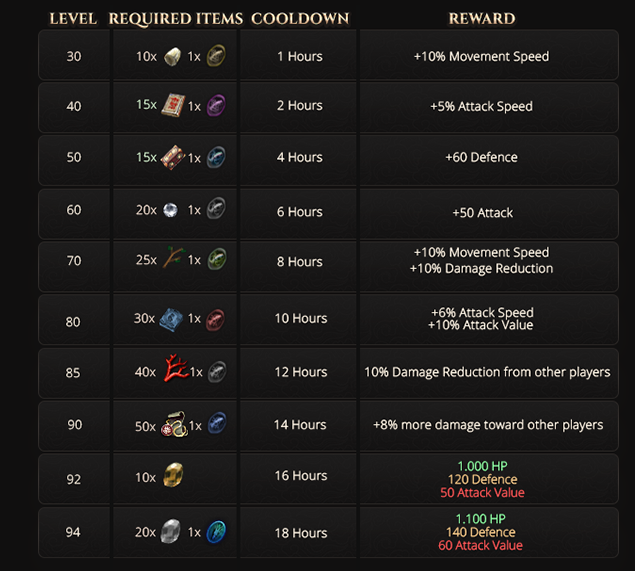
Missions start at level 30 and each one rewards a lasting bonus: movement and attack speed, defence, attack, damage reduction and, at the top, HP, Defence and Attack Value together.
Compete & Earn
Battlepass
The Battlepass adds another layer of progression to your everyday gameplay and rewards you level by level for the time you spend in Eryon.
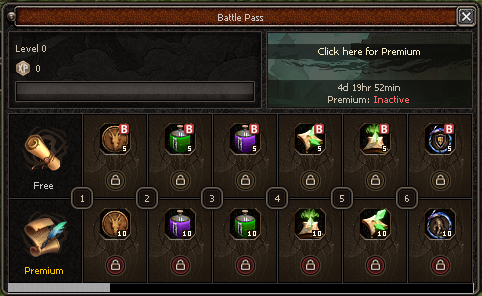
Free And Premium Tracks
As your Battlepass level rises, each level unlocks a reward on the Free Track. Players with Premium access claim an additional, larger reward on the Premium Track alongside it.
The window shows your level, your progress to the next one and how long the current season still runs, so you always know what is waiting next.
The Battlepass is designed to reward consistent activity — giving every session, small or large, an additional sense of progress.
Global Challenges
The Global Challenges are server-wide milestones that can only be claimed once: the first player to reach them takes the reward.
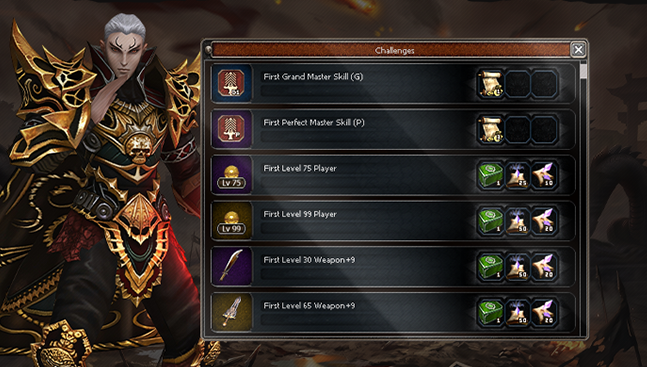
First Place, Once Only
Be the first to train a skill to Grand Master or Perfect Master, the first to reach level 75 or level 99, or the first to raise a level 30 or level 65 weapon to +9.
Every challenge has its own rewards, shown right next to it. Once a challenge has been claimed, it is gone for everyone else.
Every milestone matters, every reward is unique, and there can only be one first place.
Global Ranking
See where you stand. The Global Ranking lists the best players of the server in many categories, with each player’s empire, race and level.
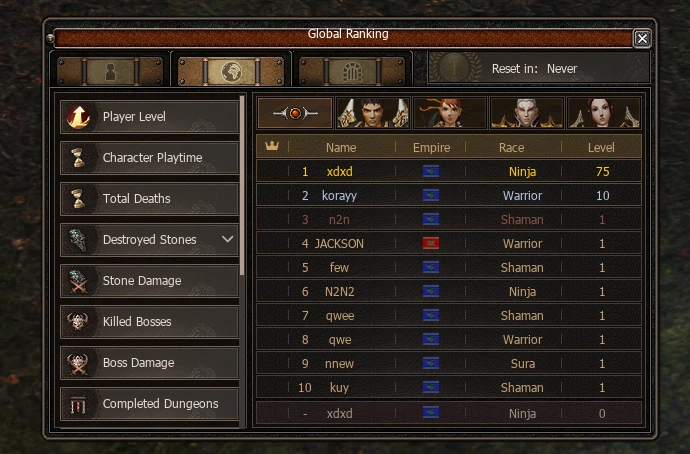
Many Ways To Lead
Pick a category and the top players are listed with their name, empire, race and level, with your own position shown at the bottom.
Filter the list by race to see who leads among Warriors, Ninjas, Suras and Shamans — there is always a ranking to climb.
Player Level
Character Playtime
Total Deaths
Destroyed Stones
Stone Damage
Killed Bosses
Boss Damage
Completed Dungeons
Trade
Trade Hub
Set up your shop and keep selling even while you are offline. The Trade Hub is where your shop is stocked, timed and paid out.
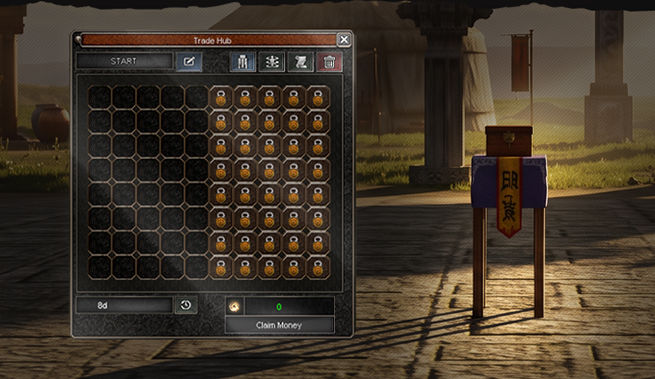
Your Shop, Always Open
Name your shop, place your items in the grid and set their prices. Your stall stays in the world and other players can buy from it while you are away.
The Trade Hub shows how long your shop stays open and how much Yang it has earned. When you are back, collect everything with Claim Money.
Trade Log
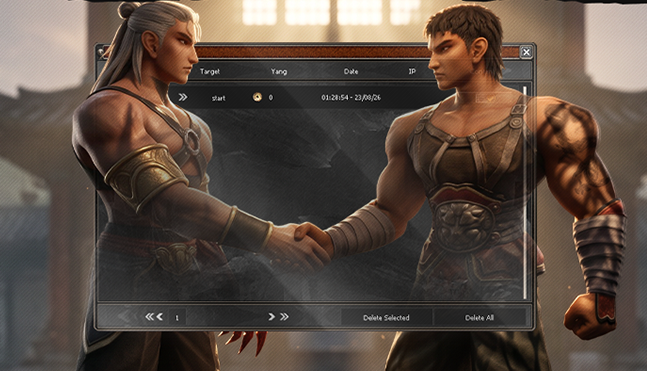
Every Trade On Record
Every trade you make is saved in your Trade Log: who you traded with, how much Yang changed hands, the exact date and time, and the IP it came from.
Look back through your history page by page, and clear old entries one by one or all at once.
Clear records mean safer trading for everyone — and an easy answer whenever you need to check a deal.
Closing Words
This concludes our presentation of the systems and features that define our gameplay experience.
Each system has been carefully designed to provide structured progression, meaningful rewards, and long-term objectives, while maintaining a clear and accessible experience for both new and experienced players.
Our focus is to create an environment where progression feels purposeful, every achievement has value, and there is always something new to work toward.
We will continue to refine, expand, and improve the experience with the same attention to quality and balance that has shaped the project from the beginning.
Thank you for your time and interest.
We look forward to welcoming you in-game.